Showing posts with label Core Java. Show all posts

Jan 19, 2014

Core java interview Questions and Answers

Here you can find the popular/regular interview question and Answers on Core java.
These Question & Answers  will help you through the first technical round of java in any organization.

Question and Answers are in .pdf format ,You can down load pdf file  or view full screen mode for reading on the scree.you can search for particular topic using search input box below the screen.


Core Java Interview Question and Answers.pdf

If you are unable to view the above message please click here to download: Download PDF Here

More Questions and Answers continues...

core java question & answers 2


If you are unable to view the above message please click here to download: Download PDF Here

More Questions and Answers continues...

core java interview questions & answers 3


If you are unable to view the above message please click here to download: Download PDF Here

More Questions and Answers continues...

core java questions & answers 04


 If you are unable to view the above message please click here to download: Download PDF Here

Jan 18, 2014

Dividing list of objects into sub lists

Some times we may need to break down the list of objects/primitives from a master/parent list and create objects/primitives sub lists.

Say, we have a list of 2000 employee numbers , and we would like to divide them into 20 sub lists of 200 employee numbers each. then the following method comes handy. it's a kind of utility method.

   /**
    * @param parentList
    * @param childListSize
    * @return
    */

    List<List<Integer>> createSubLists(List<Integer> parentList,
           int childListSize) {
        List<List<Integer>>listOfSublists = new ArrayList<List<Integer>>();
      
       int parentListSize = parentList.size();
       System.out.println("Size of the parent list:["+parentListSize+"]");
       for(int parentIndex = 0; parentIndex < parentListSize;){
           List<Integer> tempChildList = new ArrayList<Integer> ();
           for(int childIndex = 0; childIndex < childListSize ; childIndex++ ){
               if(parentIndex >= parentListSize){
                   break;
               }
               tempChildList.add(parentList.get(parentIndex++));
           }
           listOfSublists.add(tempChildList);
       }
       return listOfSublists;
   }


Execution:

Input :

parentList : [1, 2, 3, 4, 5, 6, 7, 8, 9, 10, 11, 12, 13, 14, 15, 16, 17, 18, 19, 20, 21, 22, 23, 24, 25, 26, 27, 28, 29, 30]
childListSize : 5

Output:

Size of the parent list:[30]
sub list size desired : 5
Number of sub lists divided : 6
 

List 1: [1,2,3,4,5]
List 2: [6,7,8,9,10]
List 3: [11,12,13,14,15]
List 4: [16,17,18,19, 20]
List 5: [21,22,23,24,25]
List 6: [26,27,28,29,30]


we can use this method for other data types also by making the list as generic.

Nov 22, 2012

Classpath settings in java


Notes on changing CLASSPATH

If you are using an IDE, the IDE might be doing the work of setting up your CLASSPATH, so you might not have had to deal with it.
The CLASSPATH is an environment variable.  The exact method of setting and changing it is system dependent.  In Windows 98, it gets set in your autoexec.bat using a line of the form
SET CLASSPATH=dir1;dir2;dir2;dir4
In Windows/NT, you can set the CLASSPATH from the control panel's System panel.  In Unix, you would normally set it from your profile (e.g. .profile or .cshrc file.)  If you are not sure, ask someone familiar with your operating system regarding the method of setting or changing it.  An example of an autoexec.bat line to set classpath is
SET CLASSPATH=C:\MyJspClasses;C:\ThirdPartyClasses
or even just
SET CLASSPATH=C:\MyJspClasses
The value of the classpath is one or more entries separated by the semi-colon character.   Each element is the path of a directory (folder) or the path of a .jar file.  Whether the element is a directory or a .jar file, it contains class files (with the .class extension.)  These class files get loaded by the Java interpreter and utilities.
You may not have a classpath (specially if you are using JDK 1.3,) in which case you can add one.by adding a line to your autoexec.bat or profile file, or by adding a new environment variable from your Windows NT control panel's "System" panel.
If you already have a classpath, you can insert a new directory into it.
Let us suppose you have modified your classpath and added the path C:\MyJspClasses to it, and have created the C:\MyJspClasses directory.  (On Windows 98, you would also need to re-boot your PC so the class path is in effect.  On NT, you would need to start a new command window so the new class path is picked up.  On Unix, logging in again will activate the changed profile.)
Then you can compile your bean's java file by using the command
    javac -d C:\MyJspClasses UserData.java
which will create the UserData.class file directly into C:\MyJspClasses (and would also have created any necessary directory structure if the class were in a package.)
If you had to change your classpath, typically you will also need to stop and restart your web-server so it can pick up the new classpath.

Aug 16, 2012

How to Iterate Over a Map in Java

How to Iterate Over a Map in Java

There are several ways of iterating over a Map in Java. Lets go over the most common methods and review their advantages and disadvantages. Since all maps in Java implement Map interface, following techniques will work for any map implementation (HashMap, TreeMap, LinkedHashMap, Hashtable, etc.)

Method #1: Iterating over entries using For-Each loop.

This is the most common method and is preferable in most cases. Should be used if you need both map keys and values in the loop.
Map<Integer, Integer> map = new HashMap<Integer, Integer>();
for (Map.Entry<Integer, Integer> entry : map.entrySet()) {
    System.out.println("Key = " + entry.getKey() + ", Value = " + entry.getValue());
}
Note that For-Each loop was introduced in Java 5 so this method is working only in newer versions of the language. Also For-Each loop will throw NullPointerException if you try to iterate over a map that is null, so before iterating you should always check for null references.

Method #2: Iterating over keys or values using For-Each loop.

If you need only keys or values from the map, you can iterate over keySet or values instead of entrySet.
Map<Integer, Integer> map = new HashMap<Integer, Integer>();
//iterating over keys only
for (Integer key : map.keySet()) {
    System.out.println("Key = " + key);
}
//iterating over values only
for (Integer value : map.values()) {
    System.out.println("Value = " + value);
}
This method gives slight performance advantage over entrySet iteration (about 10% faster) and is more clean.

Method #3: Iterating using Iterator.

Using Generics:
Map<Integer, Integer> map = new HashMap<Integer, Integer>();
Iterator<Map.Entry<Integer, Integer>> entries = map.entrySet().iterator();
while (entries.hasNext()) {
    Map.Entry<Integer, Integer> entry = entries.next();
    System.out.println("Key = " + entry.getKey() + ", Value = " + entry.getValue());
}
Without Generics:
Map map = new HashMap();
Iterator entries = map.entrySet().iterator();
while (entries.hasNext()) {
    Map.Entry entry = (Map.Entry) entries.next();
    Integer key = (Integer)entry.getKey();
    Integer value = (Integer)entry.getValue();
    System.out.println("Key = " + key + ", Value = " + value);
}
You can also use same technique to iterate over keySet or values.
This method might look redundant but it has its own advantages. First of all it is the only way to iterate over a map in older versions of Java. The other important feature is that it is the only method that allows you to remove entries from the map during iteration by calling iterator.remove(). If you try to do this during For-Each iteration you will get "unpredictable results" according to javadoc.
From performance point of view this method is equal to For-Each iteration.

Method #4: Iterating over keys and searching for values (inefficient).

Map<Integer, Integer> map = new HashMap<Integer, Integer>();
for (Integer key : map.keySet()) {
    Integer value = map.get(key);
    System.out.println("Key = " + key + ", Value = " + value);
}
This might look like a cleaner alternative for method #1 but in practice it is pretty slow and inefficient as getting values by a key might be time consuming (this method in different Map implementations is 20%-200% slower than method #1). If you have FindBugs installed, it will detect this and warn you about inefficient iteration. This method should be avoided.

Conclusion

If you need only keys or values from the map use method #2. If you are stuck with older version of Java (less than 5) or planning to remove entries during iteration you have to use method #3. Otherwise use method #1.

Aug 15, 2012

Loading Properties File & Using PlaceHolders

Formatting String Messages RunTime

We can format(insert/update) the string messages using MessageFormat class in java.text package from
java.MessageFormat provides a means to produce concatenated messages in language-neutral way. Use this to construct messages displayed for end users.

MessageFormat takes a set of objects, formats them, then inserts the formatted strings into the pattern at the appropriate places.

Note: MessageFormat differs from the other Format classes in that you create a MessageFormat object with one of its constructors (not with a getInstance style factory method). The factory methods aren't necessary because MessageFormat itself doesn't implement locale specific behavior. Any locale specific behavior is defined by the pattern that you provide as well as the subformats used for inserted arguments.


Code Example:
package com.java67.utility;

import java.text.ChoiceFormat;
import java.text.MessageFormat;
import java.util.Date;

public class MessageFormating {
 public static void main(String[] args) {

  // Scenario 1
  String message = "Hi this is {0}, How are you {1}";
  MessageFormat format = new MessageFormat(message);
  String printingMessage = format.format(new Object[] { "java67", "World!!" });
  System.err.println(printingMessage);

  // Scenario 2 using multiple types
  Object[] arguments = { new Integer(7),new Date(System.currentTimeMillis()),"a disturbance in the Force" };
  String result = MessageFormat.format("At {1,time} on {1,date,FULL}, there was {2} on planet {0,number,integer}.",arguments);
  System.out.println(result);
  
  // For more sophisticated patterns, you can use a ChoiceFormat to get output such as:
  MessageFormat form = new MessageFormat("The disk \"{1}\" contains {0}.");
  double[] filelimits = { 0, 1, 2 };
  String[] filepart = { "no files", "one file", "{0,number} files" };
  ChoiceFormat fileform = new ChoiceFormat(filelimits, filepart);
  form.setFormatByArgumentIndex(0, fileform);
  Object[] testArgs = { new Long(1111), "MyDisk" };
  
  System.out.println(form.format(testArgs));

  // Second approach
  Object[] testArgs2 = { new Long(4), "MyDisk" };
  form.applyPattern("There {0,choice,0#are no files|1#is one file|1<are files}");
  System.out.println(form.format(testArgs2));
 }
}


Format Type Format Style Subformat Created
(none) (none) null
number (none) NumberFormat.getInstance(getLocale())
integer NumberFormat.getIntegerInstance(getLocale())
currency NumberFormat.getCurrencyInstance(getLocale())
percent NumberFormat.getPercentInstance(getLocale())
SubformatPattern new DecimalFormat(subformatPattern, new DecimalFormatSymbols(getLocale()))
date (none) DateFormat.getDateInstance(DateFormat.DEFAULT, getLocale())
short DateFormat.getDateInstance(DateFormat.SHORT, getLocale())
medium DateFormat.getDateInstance(DateFormat.DEFAULT, getLocale())
long DateFormat.getDateInstance(DateFormat.LONG, getLocale())
full DateFormat.getDateInstance(DateFormat.FULL, getLocale())
SubformatPattern new SimpleDateFormat(subformatPattern, getLocale())
time (none) DateFormat.getTimeInstance(DateFormat.DEFAULT, getLocale())
short DateFormat.getTimeInstance(DateFormat.SHORT, getLocale())
medium DateFormat.getTimeInstance(DateFormat.DEFAULT, getLocale())
long DateFormat.getTimeInstance(DateFormat.LONG, getLocale())
full DateFormat.getTimeInstance(DateFormat.FULL, getLocale())
SubformatPattern new SimpleDateFormat(subformatPattern, getLocale())
choice SubformatPattern new ChoiceFormat(subformatPattern)

For more Info : click here

Jun 8, 2012

Iterate over a Map using Java 5 generics

Iterate over a Map using Java 5 generics

One of the coolest features in Java 5 is the enhanced for loop. Instead of having to use clunky Iterators to loop through a Map, you can use the enhanced for loop just as though you were iterating over an array, a List, or other collection.

Another neat feature in Java 5 is the addition of generics, which help to promote type safety. If you try to stuff an object of the wrong type into your collection, you’ll get an error at compile time instead of runtime, which is usually a good thing. Our examples will use generics along with the enhanced for loop.

Old School example (using Iterator)

Map items = new HashMap();
//...
//fill the map with String, Object values
//...
Iterator it = items.keySet().iterator();
while (it.hasNext()) {
String key = (String) it.next();
String value = (Object) items.get(key);
//do stuff here
}

Java 5 example (using generics)

Map items = new HashMap();
//fill map with String, String values
…
for (Map.Entry
entry : items.entrySet()) {
String key = entry.getKey();
String value = entry.getValue();
//do stuff here
}


Using the enhanced for loop with generics really makes the code cleaner, and we don’t have to mess with type casting when retrieving the object from the collection. Just remember that the enhanced for loop does have limitations – for instance, we can’t use it if we want to remove an object from our collection. In that case, we would have to use an Iterator. But if you’re only retrieving the elements, the enhanced for loop is more than adequate.

Dec 13, 2011

Java Serialization

Have you ever seen what is inside a serialized object? I will explain you what is java serialization, then provide you with a sample for serialization. Finally most importantly, lets explore what is inside a serialized object and what it means. That is internals of java serialization and how does it works. If you want to have your own implementation of java serialization, this article will provide you with a good platform to launch.

What is Java Serialization?

Primary purpose of java serialization is to write an object into a stream, so that it can be transported through a network and that object can be rebuilt again. When there are two different parties involved, you need a protocol to rebuild the exact same object again. Java serialization API just provides you that. Other ways you can leverage the feature of serialization is, you can use it to perform a deep copy.
Why I used ‘primary purpose’ in the above definition is, sometimes people use java serialization as a replacement for database. Just a placeholder where you can persist an object across sessions. This is not the primary purpose of java serialization. Sometimes, when I interview candidates for Java I hear them saying java serialization is used for storing (to preserve the state) an object and retrieving it. They use it synonymously with database. This is a wrong perception for serialization.

How do you serialize?

When you want to serialize an object, that respective class should implement the marker interface serializable. It just informs the compiler that this java class can be serialized. You can tag properties that should not be serialized as transient. You open a stream and write the object into it. Java API takes care of the serialization protocol and persists the java object in a file in conformance with the protocol. De-serialization is the process of getting the object back from the file to its original form.
Here protocol means, understanding between serializing person and de-serializing person. What will be the contents of file containing the serialized object? This serves as a guideline to de-serialize. Have a look at the following sample and how its serialized file looks.

Sample Source Code for Java Serialization

package com.javapapers.sample;
import java.io.FileInputStream;
import java.io.FileNotFoundException;
import java.io.FileOutputStream;
import java.io.IOException;
import java.io.ObjectInputStream;
import java.io.ObjectOutputStream;
import java.io.Serializable;
class SerializationBox implements Serializable {
  private byte serializableProp = 10;
  public byte getSerializableProp() {
    return serializableProp;
  }
}
public class SerializationSample {
  public static void main(String args[]) throws IOException,
      FileNotFoundException, ClassNotFoundException {
    SerializationBox serialB = new SerializationBox();
    serialize("serial.out", serialB);
    SerializationBox sb = (SerializationBox) deSerialize("serial.out");
    System.out.println(sb.getSerializableProp());
  }
  public static void serialize(String outFile, Object serializableObject)
      throws IOException {
    FileOutputStream fos = new FileOutputStream(outFile);
    ObjectOutputStream oos = new ObjectOutputStream(fos);
    oos.writeObject(serializableObject);
  }
  public static Object deSerialize(String serilizedObject)
      throws FileNotFoundException, IOException, ClassNotFoundException {
    FileInputStream fis = new FileInputStream(serilizedObject);
    ObjectInputStream ois = new ObjectInputStream(fis);
    return ois.readObject();
  }
}

Exploring Java Serialization

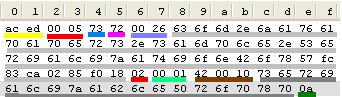
Look at following image. After serializing ‘SerializationBox’ in the above sample code, I opened the output in a hex editor. You can use Notepad++ and hex plugin to open the serialized file.
Let us look at contents byte by byte and find out what they are. It starts with “ac ed”. It is is called STREAM_MAGIC. It is a magic number (java API guys says) that is written to the stream header. It denotes that is start of serialzed content.Serialized Output
Similarly every character has a meaning. Actually the serialized file is more bulkier than you would expect, as it has a huge header the meta information of the classes involved and finally the content. Object Serialization Stream Protocol have a look at chapter 6.4.2 Terminal Symbols and Constants. It gives you list of symbols and constants used in serialization.

Decrypting Serialized Java Object

In the image, I have underline a unit of information in a separate color for you to easily identify.
ac ed – STREAM_MAGIC – denotes start of serialzed content
00 05 – STREAM_VERSION – serialization version
73 – TC_OBJECT – new Object
72 – TC_CLASSDESC – new Class Descriptor
00 26 – length of the class name
63 6f 6d 2e 6a 61 76 61 70 61 70 65 72 73 2e 73 61 6d 70 6c 65 2e 53 65 72 69 61 6c 69 7a 61 74 69 6f 6e 42 6f 78 – class name
57 fc 83 ca 02 85 f0 18 – SerialVersionUID
02 – this object is serializable
00 01 – count of properties in the serialzed class – one property in our example
42 00 10 – private byte
73 65 72 69 61 6c 69 7a 61 62 6c 65 50 72 6f 70 78 70 – property name – serializableProp in our example
0a – 10 the value – This is the persisted value of the property in our sample

Dec 10, 2011

The Static Imports in JAVA

There are situations where you need frequent access to static final fields (constants) and static methods from one or two classes. Prefixing the name of these classes over and over can result in cluttered code. The static import statement gives you a way to import the constants and static methods that you want to use so that you do not need to prefix the name of their class.

The java.lang.Math class defines the PI constant and many static methods, including methods for calculating sines, cosines, tangents, square roots, maxima, minima, exponents, and many more. For example,

public static final double PI 3.141592653589793
 public static double cos(double a)

Ordinarily, to use these objects from another class, you prefix the class name, as follows.

double r = Math.cos(Math.PI * theta);
You can use the static import statement to import the static members of java.lang.Math so that you don't need to prefix the class name, Math. The static members of Math can be imported either individually:

import static java.lang.Math.PI;
or as a group:
import static java.lang.Math.*;

Once they have been imported, the static members can be used without qualification. For example, the previous code snippet would become:
double r = cos(PI * theta);

Obviously, you can write your own classes that contain constants and static methods that you use frequently, and then use the static import statement. For example,
import static mypackage.MyConstants.*;

---------------------------------------------------------------
Note: Use static import very sparingly. Overusing static import can result in code that is difficult to read and maintain, because readers of the code won't know which class defines a particular static object. Used properly, static import makes code more readable by removing class name repetition.

Nov 27, 2011

Different ways of creating Objects in java

There are four different ways (I really don’t know is there a fifth way to do this) to create objects in java:

1. Using new keyword
This is the most common way to create an object in java. I read somewhere that almost 99% of objects are created in this way.

MyObject object = new MyObject();

2. Using Class.forName()
If we know the name of the class in run time  & if it has a public default constructor we can create an object in this way.

MyObject object = (MyObject) Class.forName("subin.rnd.MyObject").newInstance();

3. Using clone()
The clone() can be used to create a copy of an existing object.

MyObject anotherObject = new MyObject();
MyObject object = anotherObject.clone();

4. Using object deserialization
Object deserialization is nothing but creating an object from its serialized form.

ObjectInputStream inStream = new ObjectInputStream(anInputStream );
MyObject object = (MyObject) inStream.readObject();


Main Differences Between SVN and Git