Jan 16, 2020

Jan 15, 2020
Oct 31, 2017
Mar 23, 2014
NameNotFoundException : Resource(Data Source/etc.,) Not Found
Resource(Data Source/etc.,) Not Found issue : NameNotFoundException
javax.naming.NameNotFoundException: resolved com. Remaining com/source/poolName
Failed to get connection from datasource !java.sql.SQLException: Pool connect failed : java.sql.SQLException: Data Source cpi_PoolTXDS does not exist.
Solution
- Check Whether application is pointed/attached to deployed server.

1 >> Pool name
2 >> Server name
If it is not pointed to the server , then the 'target' column in Data Source is empty as shown below.

Then we need to add/point/connect the respective pool to the server

Then you will get the target added to the data source.

Now try to access the application and you will find it's working fine.
Jan 27, 2014
Hibernate Interview Question & Answers PDF format
Here you can find the popular/regular interview question and Answers on Hibernate frame work .
These Question & Answers will help you through the technical round of java in any organization.
Question and Answers are in .pdf format ,You can
If you are unable to view please click here to download pdf file. Download Hibernate Question & Answers PDF
These Question & Answers will help you through the technical round of java in any organization.
Question and Answers are in .pdf format ,You can
- Download pdf file
- View it in full screen mode for reading on the screen.
- Search for particular topic using search input box below the screen.
If you are unable to view please click here to download pdf file. Download Hibernate Question & Answers PDF
Jan 26, 2014
JDBC Interview Questions & Answers PDF Format
Here you can find the popular/regular interview question and Answers on Spring frame work .
These Question & Answers will help you through the technical round of java in any organization.
Question and Answers are in .pdf format ,You can
If you are unable to see / find any issues you can download the same JDBC question and answers here Download JDBC Q&A PDF
These Question & Answers will help you through the technical round of java in any organization.
Question and Answers are in .pdf format ,You can
- Download pdf file
- View it in full screen mode for reading on the screen.
- Search for particular topic using search input box below the screen.
If you are unable to see / find any issues you can download the same JDBC question and answers here Download JDBC Q&A PDF
Jan 25, 2014
Spring Interview Questions & Answers PDF format
Here you can find the popular/regular interview question and Answers on Spring frame work .
These Question & Answers will help you through the technical round of java in any organization.
Question and Answers are in .pdf format ,You can
Spring-Question & Answers.pdfThese Question & Answers will help you through the technical round of java in any organization.
Question and Answers are in .pdf format ,You can
- Download pdf file
- View it in full screen mode for reading on the screen.
- Search for particular topic using search input box below the screen.
If you find issues/ not able to see please click download pdf file here Download Spring Q&A
Here it goes more Spring Question and answers here. Spring-Question_Answers-Part 2
If you find issues/ not able to see please click download pdf file here Download Spring Q&A
Jan 23, 2014
Servlets & JSP Interview Questions & Answers PDF Format
Here you can find the popular/regular interview question and Answers on java Servlets & JSP .
These Question & Answers will help you through the technical round of java in any organization.
Question and Answers are in .pdf format ,You can
If are experiencing any problem in viewing the above Servlet's Q&A in PDF view please click here:Download PDF
These Question & Answers will help you through the technical round of java in any organization.
Question and Answers are in .pdf format ,You can
- Download pdf file
- View it in full screen mode for reading on the screen.
- Search for particular topic using search input box below the screen.
If are experiencing any problem in viewing the above Servlet's Q&A in PDF view please click here:Download PDF
Jan 19, 2014
Core java interview Questions and Answers
Here you can find the popular/regular interview question and Answers on Core java.
These Question & Answers will help you through the first technical round of java in any organization.
Question and Answers are in .pdf format ,You can down load pdf file or view full screen mode for reading on the scree.you can search for particular topic using search input box below the screen.
Core Java Interview Question and Answers.pdf
If you are unable to view the above message please click here to download: Download PDF Here
More Questions and Answers continues...
core java question & answers 2
If you are unable to view the above message please click here to download: Download PDF Here
More Questions and Answers continues...
core java interview questions & answers 3
If you are unable to view the above message please click here to download: Download PDF Here
More Questions and Answers continues...
core java questions & answers 04
If you are unable to view the above message please click here to download: Download PDF Here
Jan 18, 2014
Dividing list of objects into sub lists
Some times we may need to break down the list of objects/primitives from a master/parent list and create objects/primitives sub lists.
Say, we have a list of 2000 employee numbers , and we would like to divide them into 20 sub lists of 200 employee numbers each. then the following method comes handy. it's a kind of utility method.
Execution:
Input :
parentList : [1, 2, 3, 4, 5, 6, 7, 8, 9, 10, 11, 12, 13, 14, 15, 16, 17, 18, 19, 20, 21, 22, 23, 24, 25, 26, 27, 28, 29, 30]
childListSize : 5
Output:
Size of the parent list:[30]
sub list size desired : 5
Number of sub lists divided : 6
List 1: [1,2,3,4,5]
List 2: [6,7,8,9,10]
List 3: [11,12,13,14,15]
List 4: [16,17,18,19, 20]
List 5: [21,22,23,24,25]
List 6: [26,27,28,29,30]
we can use this method for other data types also by making the list as generic.
Say, we have a list of 2000 employee numbers , and we would like to divide them into 20 sub lists of 200 employee numbers each. then the following method comes handy. it's a kind of utility method.
   /**
    * @param parentList
    * @param childListSize
    * @return
    */

    List<List<Integer>> createSubLists(List<Integer> parentList,
           int childListSize) {
        List<List<Integer>>listOfSublists = new ArrayList<List<Integer>>();

       int parentListSize = parentList.size();
       System.out.println("Size of the parent list:["+parentListSize+"]");
       for(int parentIndex = 0; parentIndex < parentListSize;){
           List<Integer> tempChildList = new ArrayList<Integer> ();
           for(int childIndex = 0; childIndex < childListSize ; childIndex++ ){
               if(parentIndex >= parentListSize){
                   break;
               }
               tempChildList.add(parentList.get(parentIndex++));
           }
           listOfSublists.add(tempChildList);
       }
       return listOfSublists;
   }
Execution:
Input :
parentList : [1, 2, 3, 4, 5, 6, 7, 8, 9, 10, 11, 12, 13, 14, 15, 16, 17, 18, 19, 20, 21, 22, 23, 24, 25, 26, 27, 28, 29, 30]
childListSize : 5
Output:
Size of the parent list:[30]
sub list size desired : 5
Number of sub lists divided : 6
List 1: [1,2,3,4,5]
List 2: [6,7,8,9,10]
List 3: [11,12,13,14,15]
List 4: [16,17,18,19, 20]
List 5: [21,22,23,24,25]
List 6: [26,27,28,29,30]
we can use this method for other data types also by making the list as generic.
Jun 14, 2013
Oracle SOA Suite 11g Certification Details
Oracle SOA Suite 11g Essentials
To Register Please Click here: Register
Certification Ownership Policy
Individual candidates are certified when the prerequisite requirements are met. The certification is valid and associated with an individual, and not a specific company.
Certification Validity Policy
Once a candidate achieves a certification, this certification does not expire or retire. The certification path, or the exam(s) that lead to this certification may retire, but the certification remains valid at the level and version obtained by the candidate. This includes certifications granted by companies acquired by Oracle. Any certification granted prior to the acquisition remains a valid certification. Not all certifications will be supported or maintained, but will remain valid certifications.
Exam Scoring Policy
Exam Passing Scores:
Oracle routinely publishes new versions of its Oracle Certification exams. The passing score for each exam version is set independently to maintain a consistent scoring standard across versions. For example, to maintain a consistent standard for success, a new version of an exam which contains more difficult questions than the prior version will be assigned a somewhat lower required passing score. For this reason, passing scores may vary between different exams in your certification track, and between later and earlier versions of the same exam.
Oracle does not recommend an exam preparation strategy targeting the passing score, as passing scores are subject to change without notice.
Scored and Unscored Questions:
Your exam may contain unscored questions in addition to the scored questions, so the total number of questions that are presented to you may be greater than the number shown on the exam page. This is standard testing practice. You will not know which questions are unscored. If your exam contains unscored questions, the time allowed for the exam takes into consideration the time you will need to answer all questions and review your work. Your exam results will reflect your performance on the scored questions only.
Study Guide For SOA Exam:
soasuite11g-Study-Guide
Frequently Asked Questions on SOA exam:
SOA 11g-FAQ.pdf
- Exam Number: 1Z0-478
- Associated Certifications: Oracle SOA Suite 11g Certified Implementation Specialist.
- Exam Product Version: SOA Suite,
- Exam Price: US$ 245 (More on exam pricing)
- Duration: 120 minutes
- Number of Questions: 73
- Passing Score: 60% View passing score policy
- Format: Multiple Choice
To Register Please Click here: Register
Certification Ownership Policy
Individual candidates are certified when the prerequisite requirements are met. The certification is valid and associated with an individual, and not a specific company.
Certification Validity Policy
Once a candidate achieves a certification, this certification does not expire or retire. The certification path, or the exam(s) that lead to this certification may retire, but the certification remains valid at the level and version obtained by the candidate. This includes certifications granted by companies acquired by Oracle. Any certification granted prior to the acquisition remains a valid certification. Not all certifications will be supported or maintained, but will remain valid certifications.
Exam Scoring Policy
Exam Passing Scores:
Oracle routinely publishes new versions of its Oracle Certification exams. The passing score for each exam version is set independently to maintain a consistent scoring standard across versions. For example, to maintain a consistent standard for success, a new version of an exam which contains more difficult questions than the prior version will be assigned a somewhat lower required passing score. For this reason, passing scores may vary between different exams in your certification track, and between later and earlier versions of the same exam.
Oracle does not recommend an exam preparation strategy targeting the passing score, as passing scores are subject to change without notice.
Scored and Unscored Questions:
Your exam may contain unscored questions in addition to the scored questions, so the total number of questions that are presented to you may be greater than the number shown on the exam page. This is standard testing practice. You will not know which questions are unscored. If your exam contains unscored questions, the time allowed for the exam takes into consideration the time you will need to answer all questions and review your work. Your exam results will reflect your performance on the scored questions only.
Study Guide For SOA Exam:
soasuite11g-Study-Guide
Frequently Asked Questions on SOA exam:
SOA 11g-FAQ.pdf
Jan 27, 2013
SCJP / OCP JP Ceritificaton PRogram Information
Hyderabad Sun Learning Centre
# 204 B, 2nd Floor, Surekha Chambers
Opp: VIP Showroom
Near Lal Bunglow
Ameerpet, Hyderabad -500-016
Contact: Mr Stanley
Phone: +91 99595 39947
Email: stanley@rpssoft.com, sunil@rpssoft.com
The approximate cost of taking the exam is: 7500
SCJP 6.0 Certification Exam
*As per the day of this article.
# 204 B, 2nd Floor, Surekha Chambers
Opp: VIP Showroom
Near Lal Bunglow
Ameerpet, Hyderabad -500-016
Contact: Mr Stanley
Phone: +91 99595 39947
Email: stanley@rpssoft.com, sunil@rpssoft.com
The approximate cost of taking the exam is: 7500
SCJP 6.0 Certification Exam
Exam Info
| Exam number | CX-310-065 |
| Prerequisites | None |
| Exam type | Multiple choice and drag and drop |
| Number of questions | 72 |
| Passing score | 65% (47 of 72 questions) |
| Time limit | 210 minutes |
| Delivered at | Authorized Worldwide Prometric Testing Centers |
- Exam Number - CX-310-065
- Prerequisites - None
- Type of Questions - The type of questions asked in the exam are multiple-choice(single response and multiple response), and drag-n-drop. Again, if a multiple-choice question has more than one correct choice, it is explicitly stated in the question.
- Time - The time allowed to complete this exam is 210 minutes, which is sufficient. You are allowed to go back to earlier questions during the exam, but take care that you are able to review only the marked questions, once all questions are filled in.
- Passing % - You need to obtain at least 65% to be successful. The exam asks you 72 questions and you need to correctly answer at least 47. Note: sometimes one additional question is added for testing purposes. This additional question is not used for the passing score.
- Cost - US $ 300 (or locally priced)
- Related exams - Sun Certified Programmer for the Java Platform, Standard Edition 6 Upgrade Exam (CX-310-066) for candidates who have already successfully certified on a previous version of SCJP.
Useful Resources
- Books - Preparatory books are a valuable asset for any IT Certification preparation. Here are some recommended books for the exam:
-
Scjp Sun Certified Programmer for Java 5: Exam (310-055)
by Kathy Sierra (Author)
- SCJP Sun Certified Programmer for Java 5 Study Guide
by Sierra and Bert Bates
- SCJP Sun Certified Programmer for Java 5 Practice Exams
by Katherine Sierra (Author), Bert Bates (Author)
- SCJP Exam for J2SE 5: A Concise and Comprehensive Study Guide for The Sun Certified Java Programmer Exam
by Paul Sanghera (Author)
- Fast Track to Sun Certified Java Programmer (SCJP) 5.0 Upgrade Exam
by Ka, Iok Tong (Author)
- References
- Download the JSR from here.
- Get a quick overview with J2SE 6.0 release notes.
- Read J2SE 5.0 in a nutshell
- Read about the new Language Features
- Test yourself with Tiger Quiz
- Documentation on enhancments in J2SE 5.0 (also for 6.0)
- Tutorials and Articles - There are numerous tutorials
freely available on the web. The most reliable and
recommended of these are by Sun. Following is a list of some
highly useful tutorials and articles for the exam:
- The Generics tutorial by Sun.
- Taming Tiger archives: Read about 5.0 features in the Taming Tiger archives at developerWorks.
- Taming Tiger, Part 1 By Tarak Modi, JavaWorld.com

Mock Exams - Fulfill the need to practice for the exam.
http://www.jchq.net/mockexams/exam1.htm
http://www.javacertificationexams.com/scjp-mock-exams.php
Tips and Tricks
- Try to get a group together to study with, it makes it easier.
- As you progress through your study you will begin to get a ‘feeling’ for what the question is asking.
- Read, practice, sit practice exams and discuss with colleagues over and over again.
- If you buy a certification book (recommended) be prepared to read your chosen study book 3 times.
- In the Drag and Drop type questions, the answer gets reset if you try to review it. So, always complete and double check your answer before moving away from a Drag and Drop question.
- It would be helpful to solve Drag and Drop questions on a sheet of paper before actually attempting them in the test.
- The revised exam has more performance-based questions than knowledge-based questions requiring memorization of API details. So spend more time on hands-on practice, especially of commonly used methods, and avoid trying to memorize each and every API detail simply by reading.
- Be clear about the classes implementing the Collection types like List, Set, and Map. Be aware of which of these types support sorting, which allow duplicates, which give the best performance, and so on.
- Remember that immutable string objects are returned by the String class. StringBuilder and StringBufffer both return mutable strings; the only difference between them is that StringBuffer is thread-safe, while the other is not.
- When you see the usage of varargs in a method, ensure that the ellipsis is appearing as the last argument to the method.
- Remember that the super type of generic Collection objects is Collection and not Collection
- Remember that since the wildcard (?) stands for an unknown type, you cannot add to generic types using wildcards.
- Know the distinction between Comparable and Comparator and the methods defined by these interfaces.
- Ask your employer to pay for the exam. They may pay or reimburse you if you pass the exam?
- Whizlbs ***
Nov 22, 2012
Classpath settings in java
Notes on changing CLASSPATH
If you are using an IDE, the IDE might be doing the work of setting up your CLASSPATH, so you might not have had to deal with it.
The
CLASSPATH is an environment variable. The exact method of setting and
changing it is system dependent. In Windows 98, it gets set in your autoexec.bat using a line of the form
SET CLASSPATH=dir1;dir2;dir2;dir4
In
Windows/NT, you can set the CLASSPATH from the control panel's System
panel. In Unix, you would normally set it from your profile (e.g.
.profile or .cshrc file.) If you are not sure, ask someone familiar
with your operating system regarding the method of setting or changing
it. An example of an autoexec.bat line to set classpath is
SET CLASSPATH=C:\MyJspClasses;C:\ThirdPartyClasses
or even just
SET CLASSPATH=C:\MyJspClasses
The
value of the classpath is one or more entries separated by the
semi-colon character. Each element is the path of a directory (folder)
or the path of a .jar file. Whether the element is a directory or a
.jar file, it contains class files (with the .class extension.) These class files get loaded by the Java interpreter and utilities.
You
may not have a classpath (specially if you are using JDK 1.3,) in which
case you can add one.by adding a line to your autoexec.bat or profile
file, or by adding a new environment variable from your Windows NT
control panel's "System" panel.
If you already have a classpath, you can insert a new directory into it.
Let us suppose you have modified your classpath and added the path C:\MyJspClasses to it, and have created the C:\MyJspClasses directory.
(On Windows 98, you would also need to re-boot your PC so the class
path is in effect. On NT, you would need to start a new command window
so the new class path is picked up. On Unix, logging in again will
activate the changed profile.)
Then you can compile your bean's java file by using the command
javac -d C:\MyJspClasses UserData.java
which will create the UserData.class file directly into C:\MyJspClasses (and would also have created any necessary directory structure if the class were in a package.)
If
you had to change your classpath, typically you will also need to stop
and restart your web-server so it can pick up the new classpath.
Oct 17, 2012
know about your JSP and Servlet Versions
It's always better to know what version of servlet container we are using and which version of JSP is compatible with that.
To know the version of servlet containr and JSP versions , you can use the following lines in JSP.
The JSP version usually goes hand in hand with the servlet version as follows:
Servlet Engine: <%=session.getServletContext().getMajorVersion()%>.<%=session.getServletContext().getMinorVersion()%>

JSP Engine: <%=JspFactory.getDefaultFactory().getEngineInfo().getSpecificationVersion()%>

Application Server: <%=application.getServerInfo()%>
(OR)
Server info: <%= application.getServerInfo() %>

Servlet version: <%= application.getMajorVersion() %>.<%= application.getMinorVersion() %>

JSP version: <%= JspFactory.getDefaultFactory().getEngineInfo().getSpecificationVersion() %>

Java version: <%= System.getProperty("java.version") %>
The actually used Servlet API version is to be found in the web.xml root declaration.The JSP version usually goes hand in hand with the servlet version as follows:
- Servlet 2.5 uses JSP 2.1
- Servlet 2.4 uses JSP 2.0
- Servlet 2.3 uses JSP 1.2
- Servlet 2.2 uses JSP 1.1
- Servlet 2.1 uses JSP 1.0
Aug 16, 2012
How to Iterate Over a Map in Java
How to Iterate Over a Map in Java

Map
in Java. Lets go over the most common methods and review their
advantages and disadvantages. Since all maps in Java implement Map
interface, following techniques will work for any map implementation (HashMap,
TreeMap, LinkedHashMap, Hashtable,
etc.)Method #1: Iterating over entries using For-Each loop.
This is the most common method and is preferable in most cases. Should be used if you need both map keys and values in the loop.Map<Integer, Integer> map = new HashMap<Integer, Integer>();
for (Map.Entry<Integer, Integer> entry : map.entrySet()) {
System.out.println("Key = " + entry.getKey() + ", Value = " + entry.getValue());
}
NullPointerException if you try to iterate over a map
that is null, so before iterating you should always check
for null references.Method #2: Iterating over keys or values using For-Each loop.
If you need only keys or values from the map, you can iterate overkeySet
or values instead of entrySet.Map<Integer, Integer> map = new HashMap<Integer, Integer>();
//iterating over keys only
for (Integer key : map.keySet()) {
System.out.println("Key = " + key);
}
//iterating over values only
for (Integer value : map.values()) {
System.out.println("Value = " + value);
}
entrySet
iteration (about 10% faster) and is more clean.
Method #3: Iterating using Iterator.
Using Generics:Map<Integer, Integer> map = new HashMap<Integer, Integer>();
Iterator<Map.Entry<Integer, Integer>> entries = map.entrySet().iterator();
while (entries.hasNext()) {
Map.Entry<Integer, Integer> entry = entries.next();
System.out.println("Key = " + entry.getKey() + ", Value = " + entry.getValue());
}
Map map = new HashMap();
Iterator entries = map.entrySet().iterator();
while (entries.hasNext()) {
    Map.Entry entry = (Map.Entry) entries.next();
    Integer key = (Integer)entry.getKey();
    Integer value = (Integer)entry.getValue();
    System.out.println("Key = " + key + ", Value = " + value);
}
keySet
or values.This method might look redundant but it has its own advantages. First of all it is the only way to iterate over a map in older versions of Java. The other important feature is that it is the only method that allows you to remove entries from the map during iteration by calling
iterator.remove(). If you try to do this during
For-Each iteration you will get "unpredictable results" according to
javadoc.From performance point of view this method is equal to For-Each iteration.
Method #4: Iterating over keys and searching for values (inefficient).
Map<Integer, Integer> map = new HashMap<Integer, Integer>();
for (Integer key : map.keySet()) {
    Integer value = map.get(key);
    System.out.println("Key = " + key + ", Value = " + value);
}
Map
implementations is 20%-200% slower than method #1). If you have FindBugs installed, it will
detect this and warn you about inefficient iteration. This method
should be avoided.Conclusion
If you need only keys or values from the map use method #2. If you are stuck with older version of Java (less than 5) or planning to remove entries during iteration you have to use method #3. Otherwise use method #1.Aug 15, 2012
Formatting String Messages RunTime
We can format(insert/update) the string messages using MessageFormat class in java.text package from
java.MessageFormat provides a means to produce concatenated messages in language-neutral way. Use this to construct messages displayed for end users.
MessageFormat takes a set of objects, formats them, then inserts the formatted strings into the pattern at the appropriate places.
Note: MessageFormat differs from the other Format classes in that you create a MessageFormat object with one of its constructors (not with a getInstance style factory method). The factory methods aren't necessary because MessageFormat itself doesn't implement locale specific behavior. Any locale specific behavior is defined by the pattern that you provide as well as the subformats used for inserted arguments.
Code Example:
For more Info : click here
java.MessageFormat provides a means to produce concatenated messages in language-neutral way. Use this to construct messages displayed for end users.
MessageFormat takes a set of objects, formats them, then inserts the formatted strings into the pattern at the appropriate places.
Note: MessageFormat differs from the other Format classes in that you create a MessageFormat object with one of its constructors (not with a getInstance style factory method). The factory methods aren't necessary because MessageFormat itself doesn't implement locale specific behavior. Any locale specific behavior is defined by the pattern that you provide as well as the subformats used for inserted arguments.
Code Example:
package com.java67.utility;

import java.text.ChoiceFormat;
import java.text.MessageFormat;
import java.util.Date;

public class MessageFormating {
 public static void main(String[] args) {

  // Scenario 1
  String message = "Hi this is {0}, How are you {1}";
  MessageFormat format = new MessageFormat(message);
  String printingMessage = format.format(new Object[] { "java67", "World!!" });
  System.err.println(printingMessage);

  // Scenario 2 using multiple types
  Object[] arguments = { new Integer(7),new Date(System.currentTimeMillis()),"a disturbance in the Force" };
  String result = MessageFormat.format("At {1,time} on {1,date,FULL}, there was {2} on planet {0,number,integer}.",arguments);
  System.out.println(result);

  // For more sophisticated patterns, you can use a ChoiceFormat to get output such as:
  MessageFormat form = new MessageFormat("The disk \"{1}\" contains {0}.");
  double[] filelimits = { 0, 1, 2 };
  String[] filepart = { "no files", "one file", "{0,number} files" };
  ChoiceFormat fileform = new ChoiceFormat(filelimits, filepart);
  form.setFormatByArgumentIndex(0, fileform);
  Object[] testArgs = { new Long(1111), "MyDisk" };

  System.out.println(form.format(testArgs));

  // Second approach
  Object[] testArgs2 = { new Long(4), "MyDisk" };
  form.applyPattern("There {0,choice,0#are no files|1#is one file|1<are files}");
  System.out.println(form.format(testArgs2));
 }
}
| Format Type | Format Style | Subformat Created |
|---|---|---|
| (none) | (none) | null
|
number
| (none) | NumberFormat.getInstance(getLocale())
|
integer
| NumberFormat.getIntegerInstance(getLocale())
| |
currency
| NumberFormat.getCurrencyInstance(getLocale())
| |
percent
| NumberFormat.getPercentInstance(getLocale())
| |
| SubformatPattern | new DecimalFormat(subformatPattern, new DecimalFormatSymbols(getLocale()))
| |
date
| (none) | DateFormat.getDateInstance(DateFormat.DEFAULT, getLocale())
|
short
| DateFormat.getDateInstance(DateFormat.SHORT, getLocale())
| |
medium
| DateFormat.getDateInstance(DateFormat.DEFAULT, getLocale())
| |
long
| DateFormat.getDateInstance(DateFormat.LONG, getLocale())
| |
full
| DateFormat.getDateInstance(DateFormat.FULL, getLocale())
| |
| SubformatPattern | new SimpleDateFormat(subformatPattern, getLocale())
| |
time
| (none) | DateFormat.getTimeInstance(DateFormat.DEFAULT, getLocale())
|
short
| DateFormat.getTimeInstance(DateFormat.SHORT, getLocale())
| |
medium
| DateFormat.getTimeInstance(DateFormat.DEFAULT, getLocale())
| |
long
| DateFormat.getTimeInstance(DateFormat.LONG, getLocale())
| |
full
| DateFormat.getTimeInstance(DateFormat.FULL, getLocale())
| |
| SubformatPattern | new SimpleDateFormat(subformatPattern, getLocale())
| |
choice
| SubformatPattern | new ChoiceFormat(subformatPattern) |
For more Info : click here
Jun 8, 2012
Iterate over a Map using Java 5 generics
Iterate over a Map using Java 5 generics
One of the coolest features in Java 5 is the enhanced for loop. Instead of having to use clunky Iterators to loop through a Map, you can use the enhanced for loop just as though you were iterating over an array, a List, or other collection.
Another neat feature in Java 5 is the addition of generics, which help to promote type safety. If you try to stuff an object of the wrong type into your collection, you’ll get an error at compile time instead of runtime, which is usually a good thing. Our examples will use generics along with the enhanced for loop.
Map items = new HashMap();
//...
//fill the map with String, Object values
//...
Iterator it = items.keySet().iterator();
while (it.hasNext()) {
String key = (String) it.next();
String value = (Object) items.get(key);
//do stuff here
}
Map items = new HashMap();
//fill map with String, String values
…
for (Map.Entry entry : items.entrySet()) {
String key = entry.getKey();
String value = entry.getValue();
//do stuff here
}
Using the enhanced for loop with generics really makes the code cleaner, and we don’t have to mess with type casting when retrieving the object from the collection. Just remember that the enhanced for loop does have limitations – for instance, we can’t use it if we want to remove an object from our collection. In that case, we would have to use an Iterator. But if you’re only retrieving the elements, the enhanced for loop is more than adequate.
One of the coolest features in Java 5 is the enhanced for loop. Instead of having to use clunky Iterators to loop through a Map, you can use the enhanced for loop just as though you were iterating over an array, a List, or other collection.
Another neat feature in Java 5 is the addition of generics, which help to promote type safety. If you try to stuff an object of the wrong type into your collection, you’ll get an error at compile time instead of runtime, which is usually a good thing. Our examples will use generics along with the enhanced for loop.
Old School example (using Iterator)
Map items = new HashMap();
//...
//fill the map with String, Object values
//...
Iterator it = items.keySet().iterator();
while (it.hasNext()) {
String key = (String) it.next();
String value = (Object) items.get(key);
//do stuff here
}
Java 5 example (using generics)
Map
//fill map with String, String values
…
for (Map.Entry
String key = entry.getKey();
String value = entry.getValue();
//do stuff here
}
Using the enhanced for loop with generics really makes the code cleaner, and we don’t have to mess with type casting when retrieving the object from the collection. Just remember that the enhanced for loop does have limitations – for instance, we can’t use it if we want to remove an object from our collection. In that case, we would have to use an Iterator. But if you’re only retrieving the elements, the enhanced for loop is more than adequate.
Dec 13, 2011
Java Serialization
Have you ever seen what is inside a serialized object? I will explain
you what is java serialization, then provide you with a sample for
serialization. Finally most importantly, lets explore what is inside a
serialized object and what it means. That is internals of java
serialization and how does it works. If you want to have your own
implementation of java serialization, this article will provide you with
a good platform to launch.
What is Java Serialization?
Primary purpose of java serialization is to write an object into a
stream, so that it can be transported through a network and that object
can be rebuilt again. When there are two different parties involved, you
need a protocol to rebuild the exact same object again. Java
serialization API just provides you that. Other ways you can leverage
the feature of serialization is, you can use it to perform a deep
copy.
Why I used ‘primary purpose’ in the above definition is, sometimes
people use java serialization as a replacement for database. Just a
placeholder where you can persist an object across sessions. This is not
the primary purpose of java serialization. Sometimes, when I interview
candidates for Java I hear them saying java serialization is used for
storing (to preserve the state) an object and retrieving it. They use it
synonymously with database. This is a wrong perception for
serialization.
How do you serialize?
When you want to serialize an object, that respective class should
implement the marker
interface serializable. It just informs the compiler that this java
class can be serialized. You can tag properties that should not be
serialized as transient. You open a stream and write the object into it.
Java API takes care of the serialization protocol and persists the java
object in a file in conformance with the protocol. De-serialization is
the process of getting the object back from the file to its original
form.
Here protocol means, understanding between serializing person and
de-serializing person. What will be the contents of file containing the
serialized object? This serves as a guideline to de-serialize. Have a
look at the following sample and how its serialized file looks.
Sample Source Code for Java Serialization
package com.javapapers.sample; |
import java.io.FileInputStream; |
import java.io.FileNotFoundException; |
import java.io.FileOutputStream; |
import java.io.IOException; |
import java.io.ObjectInputStream; |
import java.io.ObjectOutputStream; |
import java.io.Serializable; |
class SerializationBox
implements Serializable { |
private byte serializableProp
= 10; |
public byte getSerializableProp()
{ |
return serializableProp; |
} |
} |
public class
SerializationSample { |
public static void
main(String args[]) throws IOException, |
FileNotFoundException,
ClassNotFoundException { |
SerializationBox
serialB =
new SerializationBox(); |
serialize("serial.out",
serialB); |
SerializationBox sb = (SerializationBox) deSerialize("serial.out"); |
System.out.println(sb.getSerializableProp()); |
} |
public static void
serialize(String outFile, Object
serializableObject) |
throws IOException { |
FileOutputStream fos =
new FileOutputStream(outFile); |
ObjectOutputStream
oos =
new ObjectOutputStream(fos); |
oos.writeObject(serializableObject); |
} |
public static Object
deSerialize(String serilizedObject) |
throws FileNotFoundException, IOException,
ClassNotFoundException { |
FileInputStream fis =
new FileInputStream(serilizedObject); |
ObjectInputStream ois
 =
new ObjectInputStream(fis); |
return ois.readObject(); |
} |
} |
Exploring Java Serialization
Look at following image. After serializing ‘SerializationBox’ in the
above sample code, I opened the output in a hex editor. You can use
Notepad++ and hex
plugin to open the serialized file.
Let us look at contents byte by byte and find out what they are. It
starts with “ac ed”. It is is called STREAM_MAGIC. It is a magic number
(java API guys says) that is written to the stream header. It denotes
that is start of serialzed content.
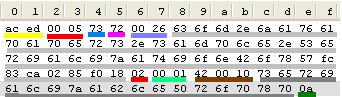
Similarly every character has a meaning. Actually the serialized file
is more bulkier than you would expect, as it has a huge header the meta
information of the classes involved and finally the content. Object
Serialization Stream Protocol have a look at chapter 6.4.2 Terminal
Symbols and Constants. It gives you list of symbols and constants used
in serialization.
Decrypting Serialized Java Object
In the image, I have underline a unit of information in a separate
color for you to easily identify.
ac ed – STREAM_MAGIC – denotes start of serialzed content
00 05 – STREAM_VERSION – serialization version
73 – TC_OBJECT – new Object
72 – TC_CLASSDESC – new Class Descriptor
00 26 – length of the class name
63 6f 6d 2e 6a 61 76 61 70 61 70 65 72 73 2e 73 61 6d 70 6c 65 2e 53 65 72 69 61 6c 69 7a 61 74 69 6f 6e 42 6f 78 – class name
57 fc 83 ca 02 85 f0 18 – SerialVersionUID
02 – this object is serializable
00 01 – count of properties in the serialzed class – one property in our example
42 00 10 – private byte
73 65 72 69 61 6c 69 7a 61 62 6c 65 50 72 6f 70 78 70 – property name – serializableProp in our example
0a – 10 the value – This is the persisted value of the property in our sample
JSP Implicit Objects
JSP Implicit objects are created by the web container. These implicit
objects are Java objects that implement interfaces in the Servlet and
JSP API. Scripting elements in a JSP page can make use of these JSP
implicit objects. There are nine (9) JSP implicit objects available.
JSP Implicit Objects are as follows:
-
request implicit object
The JSP implicit request object is an instance of a java class that implements the javax.servlet.http.HttpServletRequest interface. It represents the request made by the client. The request implicit object is generally used to get request parameters, request attributes, header information and query string values. -
response implicit object
The JSP implicit response object is an instance of a java class that implements the javax.servlet.http.HttpServletResponse interface. It represents the response to be given to the client. The response implicit object is generally used to set the response content type, add cookie and redirect the response. -
out implicit object
The JSP implicit out object is an instance of the javax.servlet.jsp.JspWriter class. It represents the output content to be sent to the client. The out implicit object is used to write the output content. -
session implicit object
The JSP implicit session object is an instance of a java class that implements the javax.servlet.http.HttpSession interface. It represents a client specific conversation. The session implicit object is used to store session state for a single user. -
application implicit object
The JSP implicit application object is an instance of a java class that implements the javax.servlet.ServletContext interface. It gives facility for a JSP page to obtain and set information about the web application in which it is running. -
exception implicit object
The JSP implicit exception object is an instance of the java.lang.Throwable class. It is available in JSP error pages only. It represents the occured exception that caused the control to pass to the JSP error page. -
config implicit object
The JSP implicit config object is an instance of the java class that implements javax.servlet.ServletConfig interface. It gives facility for a JSP page to obtain the initialization parameters available. -
page implicit object
The JSP implicit page object is an instance of the java.lang.Object class. It represents the current JSP page. That is, it serves as a reference to the java servlet object that implements the JSP page on which it is accessed. It is not advisable to use this page implict object often as it consumes large memory. -
pageContext implicit object
The JSP implicit pageContext object is an instance of the javax.servlet.jsp.PageContext abstract class. It provides useful context information. That is it provides methods to get and set attributes in different scopes and for transfering requests to other resources. Also it contains the reference to to implicit objects.
Subscribe to:
Posts (Atom)